Company
Moonbug is a global entertainment company that creates and distributes inspiring and engaging stories to expand kids' worlds and minds.
Tools
Figma, Miro
Platforms
Web app
Overview
Moonbug’s localisation and distribution teams rely on multiple systems like Salesforce, Monday.com, Google Sheets, AirTable, and Moonbase to manage content localisation requests for partners such as Netflix, Amazon and regional broadcast networks.
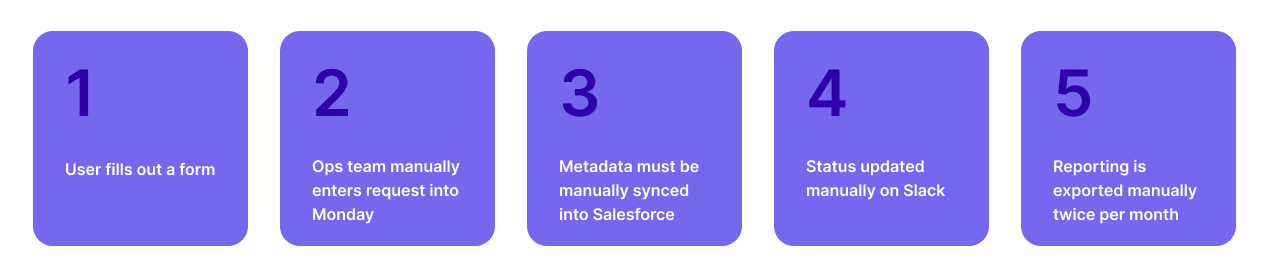
The existing workflow is fragmented, repetitive data entry, and involves manual processes.
I redesigned the entire Localisation Request Form and created a new Localisation Requests Tracker as part of a broader internal tooling initiative.
Impact:
- Reduced duplicate entries across tools
Automated manual updates, saving ~30 hours per week
Improved visibility of deadlines and request progress
Reduced reliance on 3rd-party tools and manual exports
Standardised request submissions (distribution vs localisation)
The Challenge
The team needed to streamline a workflow that was:
Highly manual,
Data duplicated across systems,
Dependent on multiple disconnected tools, and
Constrained by export and Salesforce sync limitations.
 Key operational issues:
- Status updates and reminders fully manual
- No ability to see “what’s coming up” at a glance
- Duplicate data entry across Moonbase, Salesforce, Monday
- Third party tools not syncing data properly with Internal tool (Moonbase)
Manual Salesforce metadata syncing → repetitive work
Monday.com seats are expensive and export capped at 10k (split into 2 monthly exports)
Users not trained on Salesforce and Monday → inconsistent usage
This created delays, miscommunication, and friction across localisation, distribution, and finance teams.
Research & Discovery

User Interview
I conducted interviews with teams across:
Finance Team — relies heavily on Salesforce data
Localisation & Distribution Teams — primary request submitters
Branding Team — uses a separate form for IP approvals
Content Ops — manages Moonbase metadata
User Interview Insights
Duplication – Entries made in Moonbase had to be re-added into Monday and Salesforce.
Fragmentation – Different teams used different systems; no single source of truth.
Export limitations – Monday.com’s 10k export cap slowed down reporting processes.
Repetition – Users recreated the same filters and views every time.
Lack of visibility – Users wanted to know what was in the pipeline:
“I need to know what’s coming up so I can plan ahead.”
Feature requests:
Automated Slack/email updates on request progress
A dashboard view to monitor all upcoming requests
Permanent filter templates for common request types
Touch points
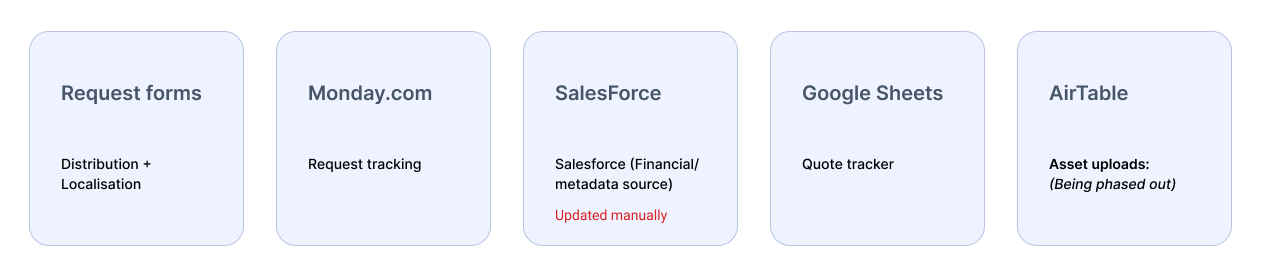
Current System Breakdown
Workflow before redesign:
User Journey Map
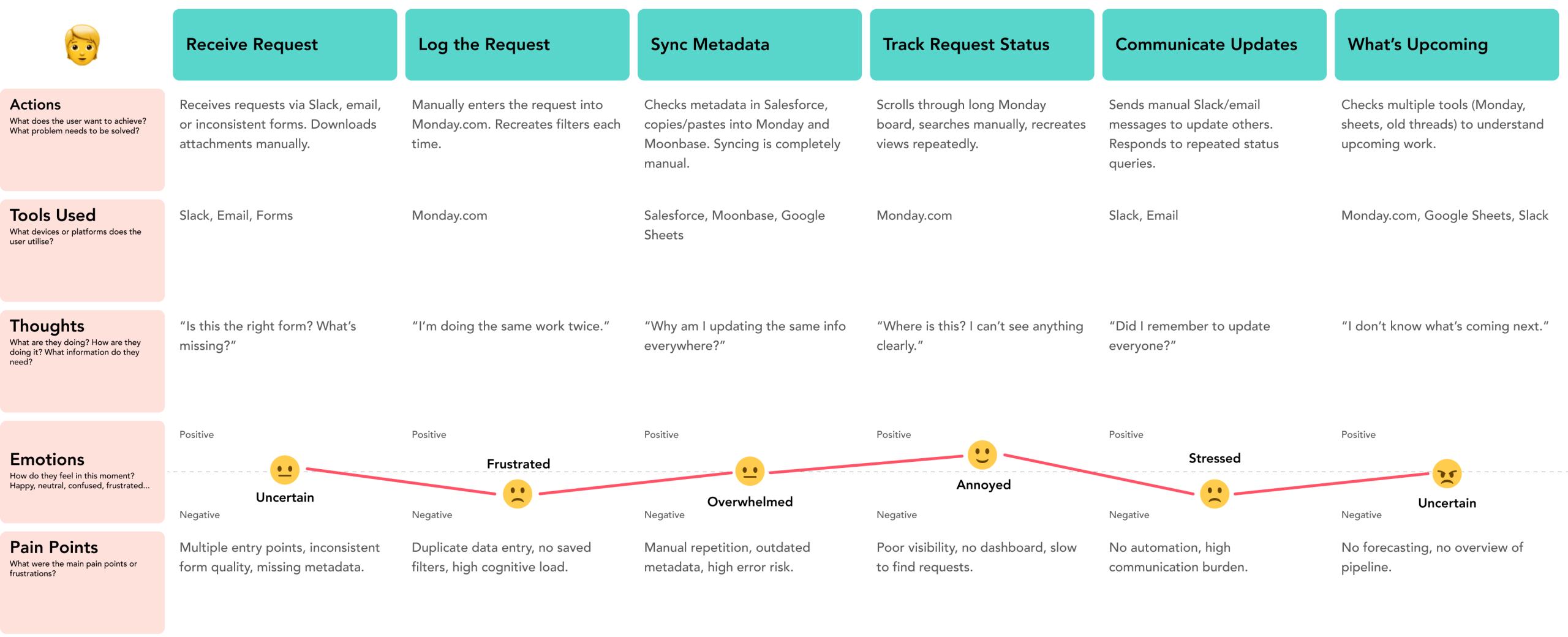
With my users in mind, I wanted to visualise the experience of the user when interacting with Moonbase and other platforms over a period of time. I created a User Journey Map to document users’ actions, thoughts, feelings, and pain points, at each individual moment in this journey. This allows me to view the platform and process in the larger context of the real world, but also helps me pinpoint specific opportunities for improvement.
Problems summarised
| Issue | Root cause | Impact |
|---|---|---|
| Duplicate data | No integrations | Inconsistent & repetitive work |
| Manual updates | No automation | Slower turnaround |
| Poor visibility | No dashboard | Missed deadlines |
| Export limits | Monday.com plan | Inefficient reporting |
| Multiple tools | Lack of centralisation | High cognitive load |
| Fragmented process | Production tracker incomplete | No unified overview |
Comparable Solution
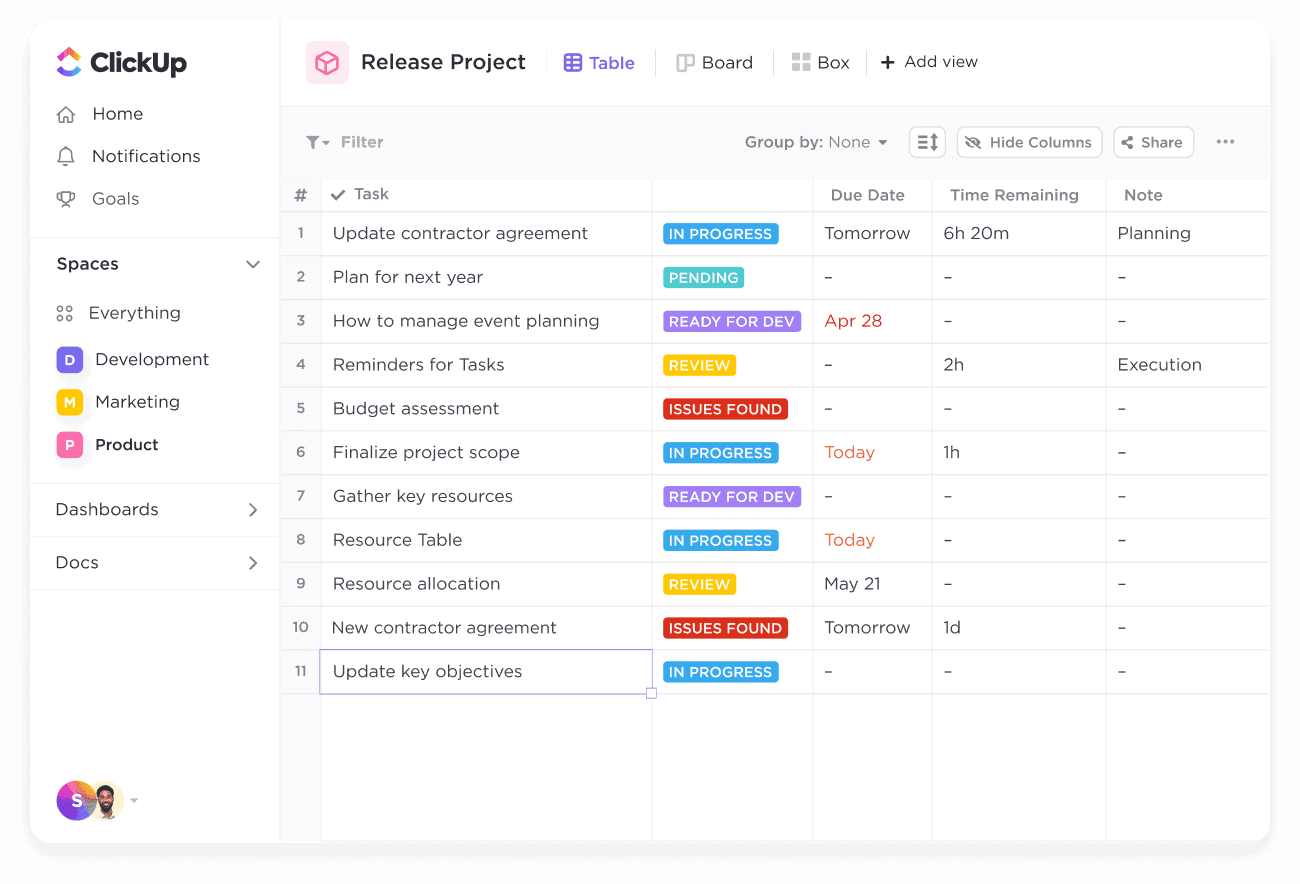
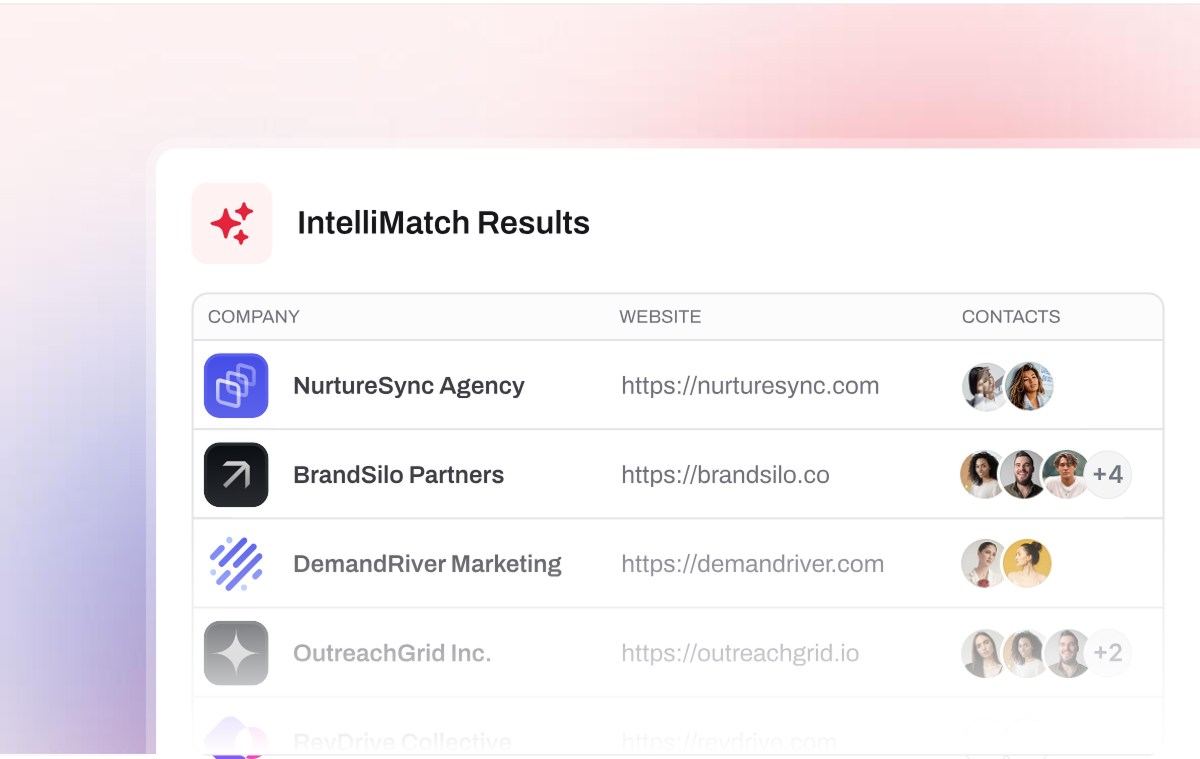
While looking at comparable solutions, I were able to identify some patterns and designs companies like ClickUp and FindyMail use in helping guide their users to build their profile.
Potential solution
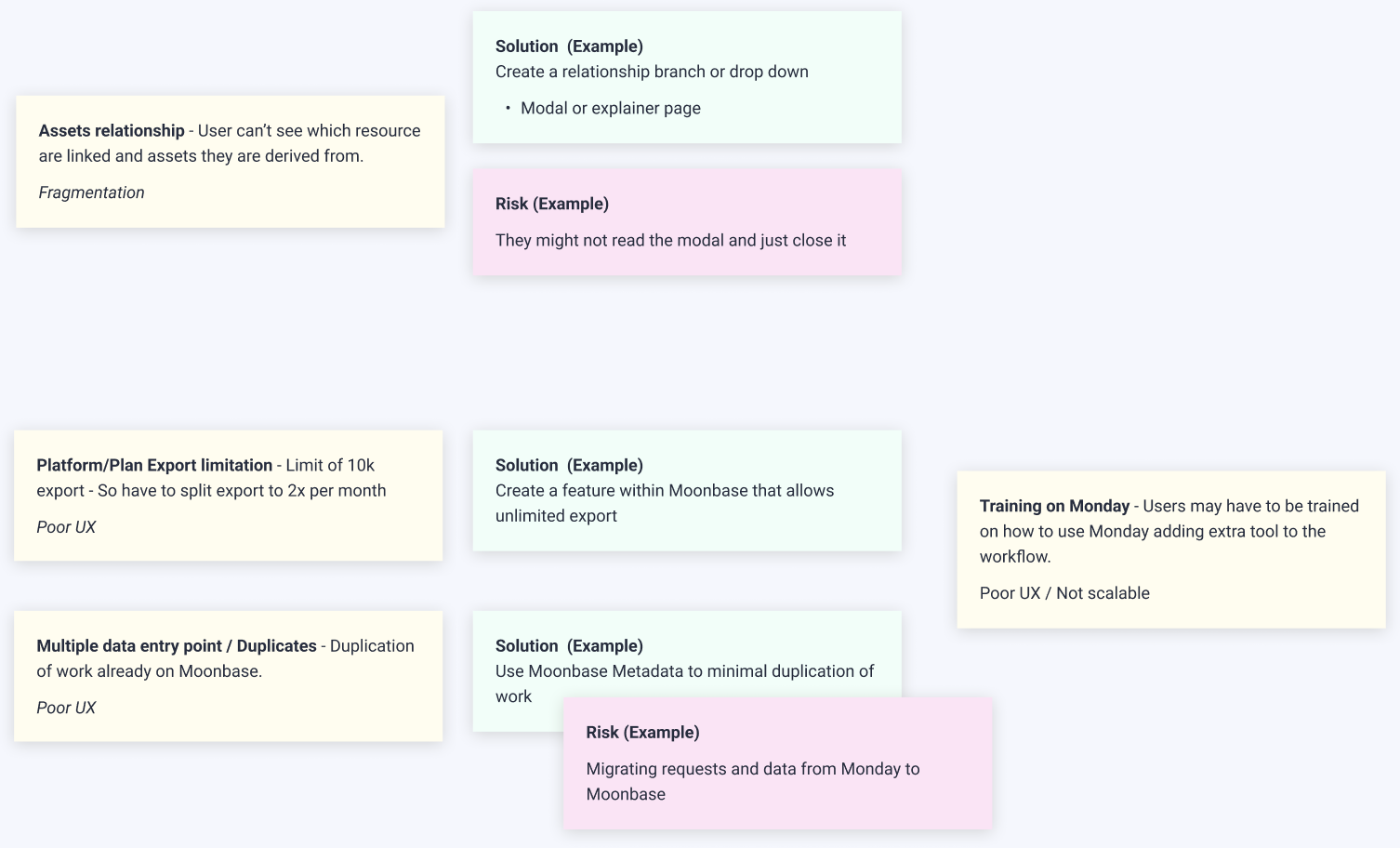
“How might we” directions included:
- HMW automate data syncing with Salesforce?
- HMW automate reminders (Slack/email)?
- HMW allow unlimited data export without restrictions?
- HMW provide visibility of upcoming work?
- HMW reduce repetitive filtering and view creation?
- HMW tie the Production Tracker into localisation workflows?
- HMW reduce duplication across systems?
HMW consolidate tools inside Moonbase?
Solution
Wireframes
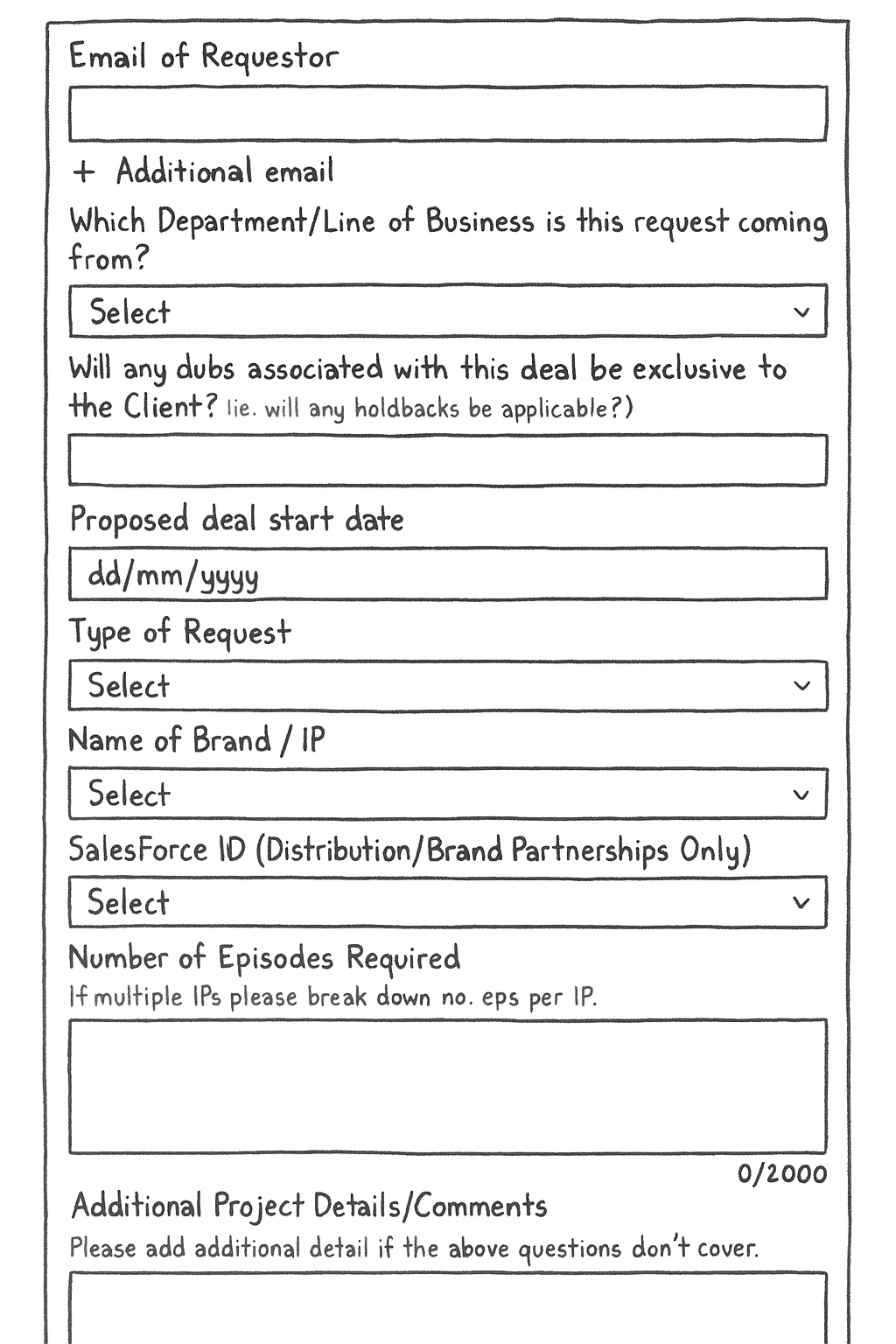
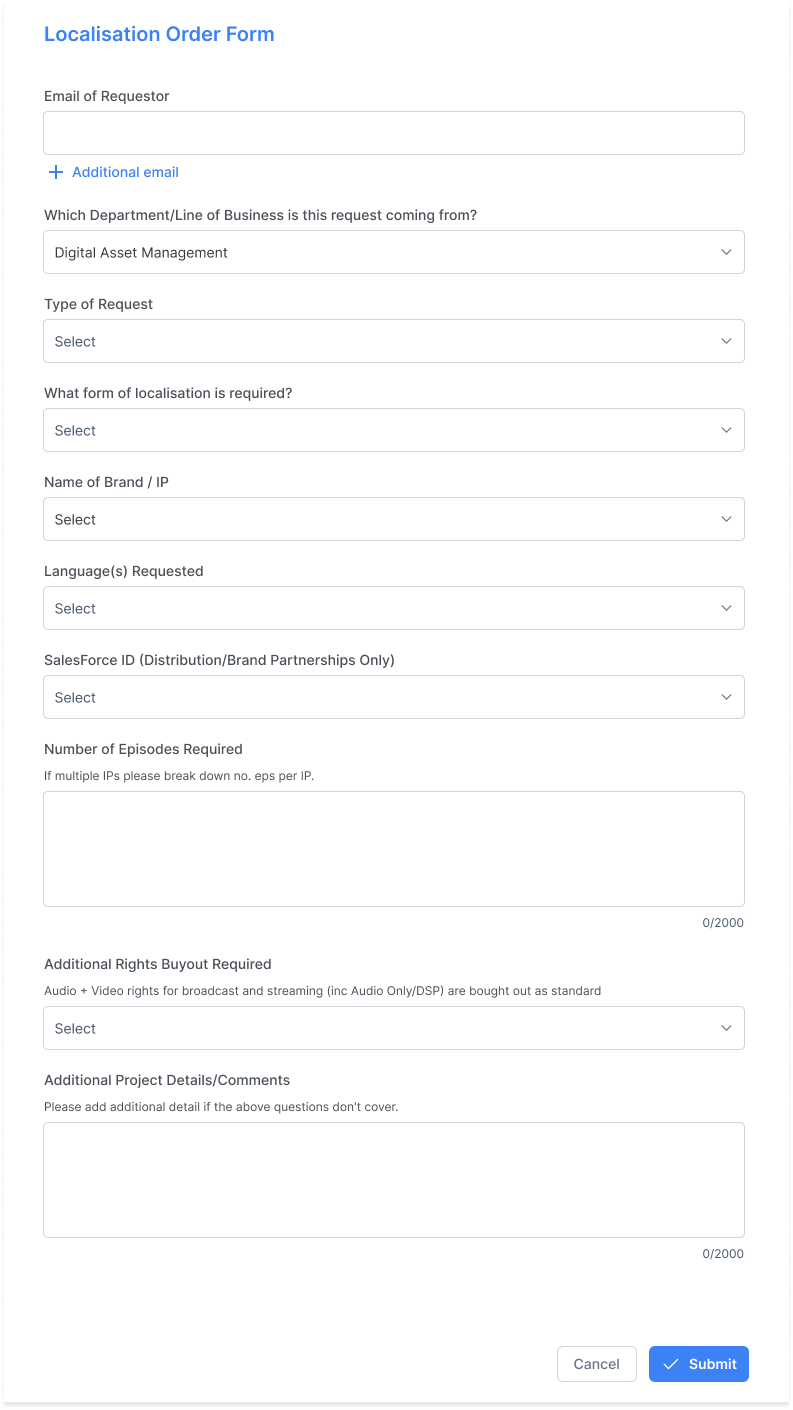
Localisation Request Form – Version 1
A. Redesigned Request Form (Distribution Team)
Cleaner structure
Structured data inputs
Mandatory Salesforce ID fields
Reduced ambiguity on licensing & rights
Helps standardise requests before they enter Monday/Salesforce
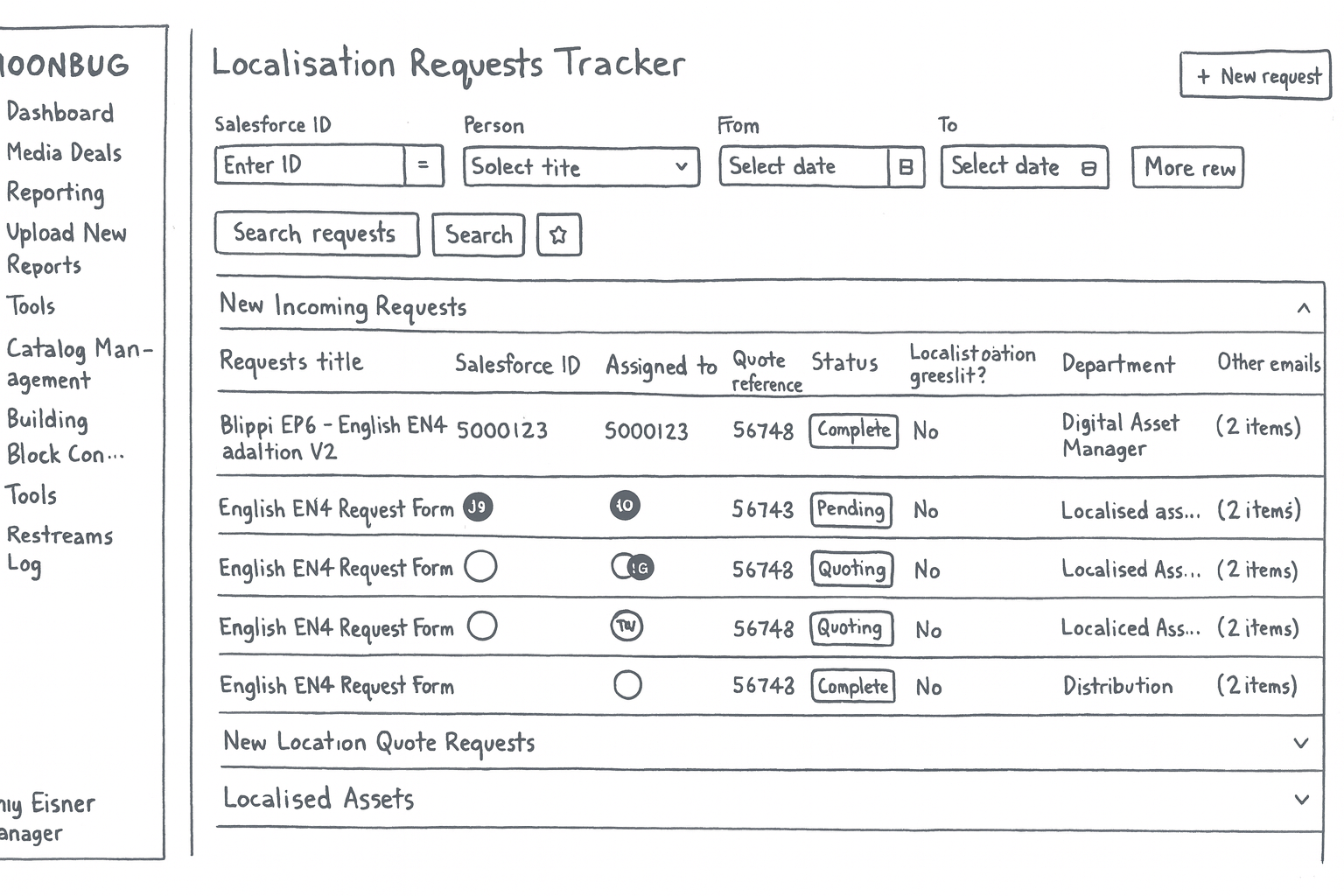
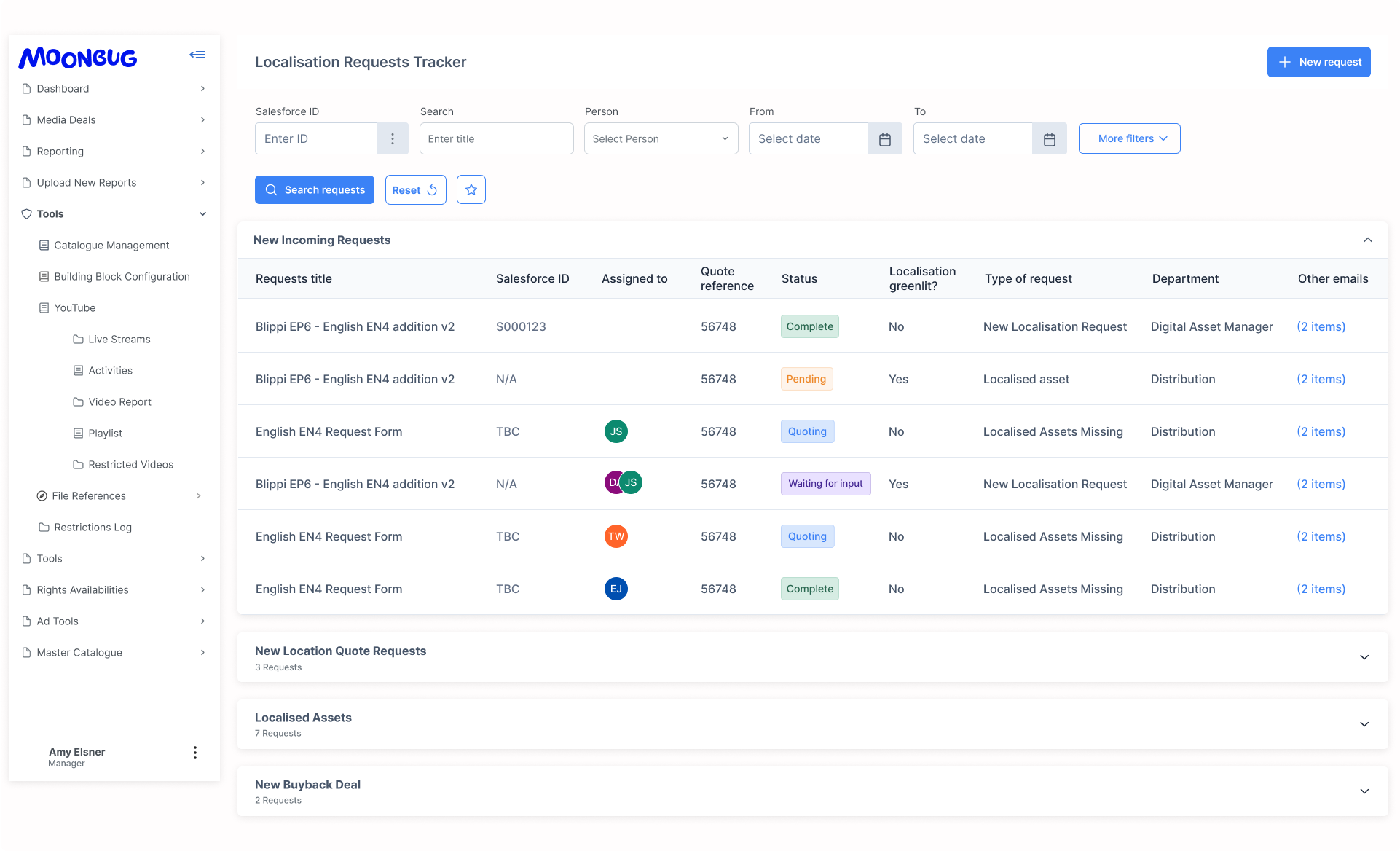
Localisation Requests Tracker (Main Tool)
- Modular sections (New Requests / Quotes / Assets / Buyback Deals)
- Integrated filters
- Ability to save views
- Status chips for quick visual scanning
- Scalable table pattern (200+ entries)
- Better readability for Ops & Finance
Testing & Iteration
To validate the redesigned localisation request system, I conducted usability testing sessions with 5 localisation managers, the primary users of the tool.
Testing Method
Format: Moderated 1:1 usability sessions
Participants: 5 localisation managers across Distribution & Content Ops
Environment: Live prototype inside Moonbug’s internal platform
Approach: Assigned realistic tasks and observed behaviour
Tasks Given
Find and review a new incoming localisation request
Use the filters to locate requests by date, person, or Salesforce ID
Check notification updates on the status of a request
Identify what’s upcoming in the pipeline
Navigate from the localisation tracker to the production tracker and understand how the two connect
These tasks reflected real daily workflows and allowed us to measure how intuitive and efficient the redesigned system felt.
What I Observed
1. Ease of navigating the request list
Participants quickly understood the structure of the main table and expanded sections (New Requests, Quote Requests, Assets, Buyback Deals).
“Everything I need is on one screen — much better.”
2. Filters were heavily used and positively received
Users found the new filter layout clearer and faster to use.
Common filters: Request type, Assigned person, Date range, Salesforce ID.
One user commented:
“I can find what I need in seconds. Before, I had to recreate my view every time.”
3. Notifications improved clarity
Participants appreciated having status indicators and notifications visible in context.
The coloured status chips (Complete, Pending, Quoting, Waiting for Input) were described as:
“Really helpful. I know instantly what’s stuck.”
4. Localisation → Production Tracker flow
All participants noted that having the localisation request link into the Production Tracker made the workflow feel more connected.
They could trace a request from submission → status → production stage without switching multiple tools.
5. Clean UI reduced cognitive load
Minimalist structure, spacing, and consistent patterns helped users focus on tasks rather than deciphering the interface.
Iterations Made After Testing
Re-ordered table columns based on what users scanned first (Title → Salesforce ID → Assigned to → Quote → Status)
Adjusted colour contrast for status chips
Improved spacing between grouped sections for easier scanning
Added hover states for more clarity on clickable rows
Simplified filter naming to match internal terminology
Introduce an AI assistant that helps with Search, notifications and flagging priorities.
Outcome
The testing validated the core design directions. Users completed tasks faster, with fewer errors, and described the new interface as:
“More intuitive, clearer, and much easier to manage than our previous process.”
Localisation Request Form (Version 2 with AI)
Here is a clickable prototype built using HTML and CSS.
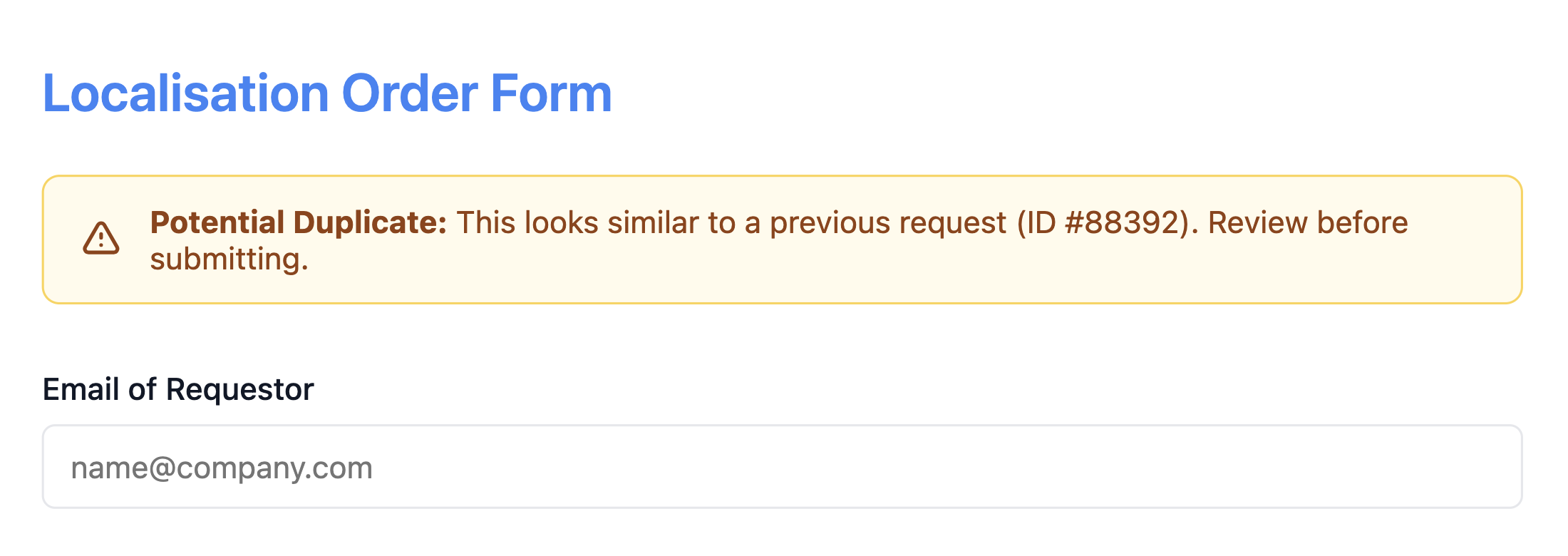
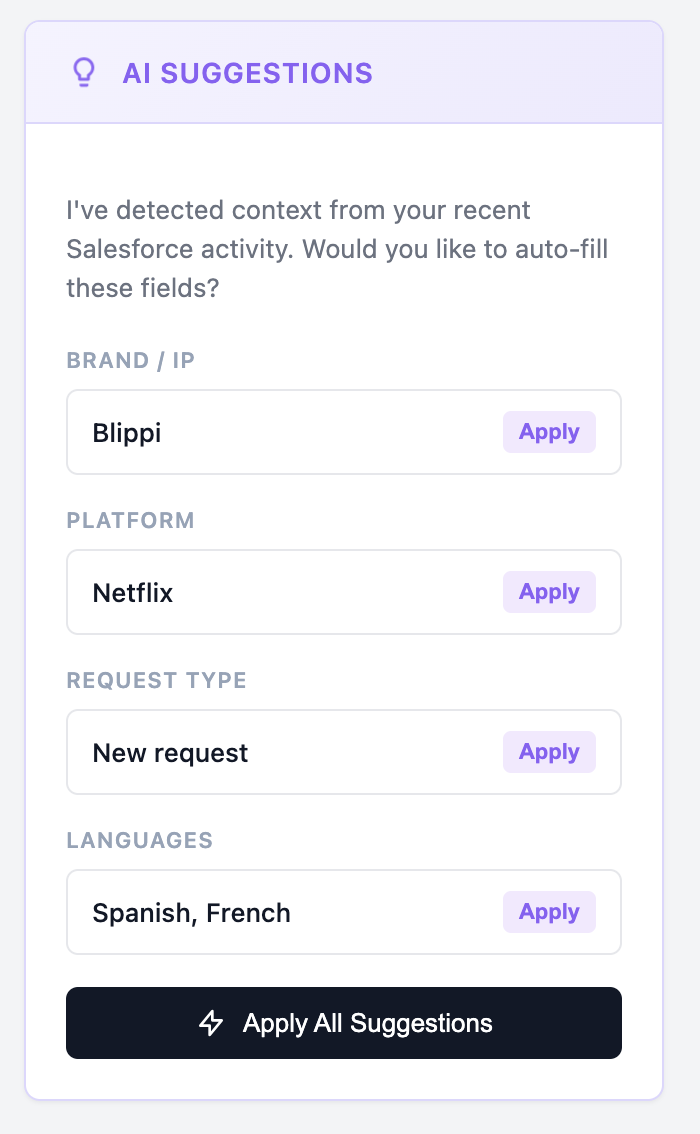
Reduce incomplete submissions and automate form filling. Most delays in the current workflow come from incomplete forms, incorrect fields, missing metadata, and back-and-forth clarification. An AI intake assistant automatically fills or suggests answers based on user inputs and historical data.
Localisation Order Form
What it does
Reads what the user is typing and fills relevant sections automatically
Suggests the correct localisation type, platform, brand/IP and language
Validates fields like Salesforce IDs or Client Names
Warns users if a request looks like a duplicate
Benefits
Cleaner data before it hits the system
Less manual correction by Ops
Reduces “back-and-forth” Slack messages
Faster, more accurate request creation
Request Tracker – AI Status & Communication Assistant
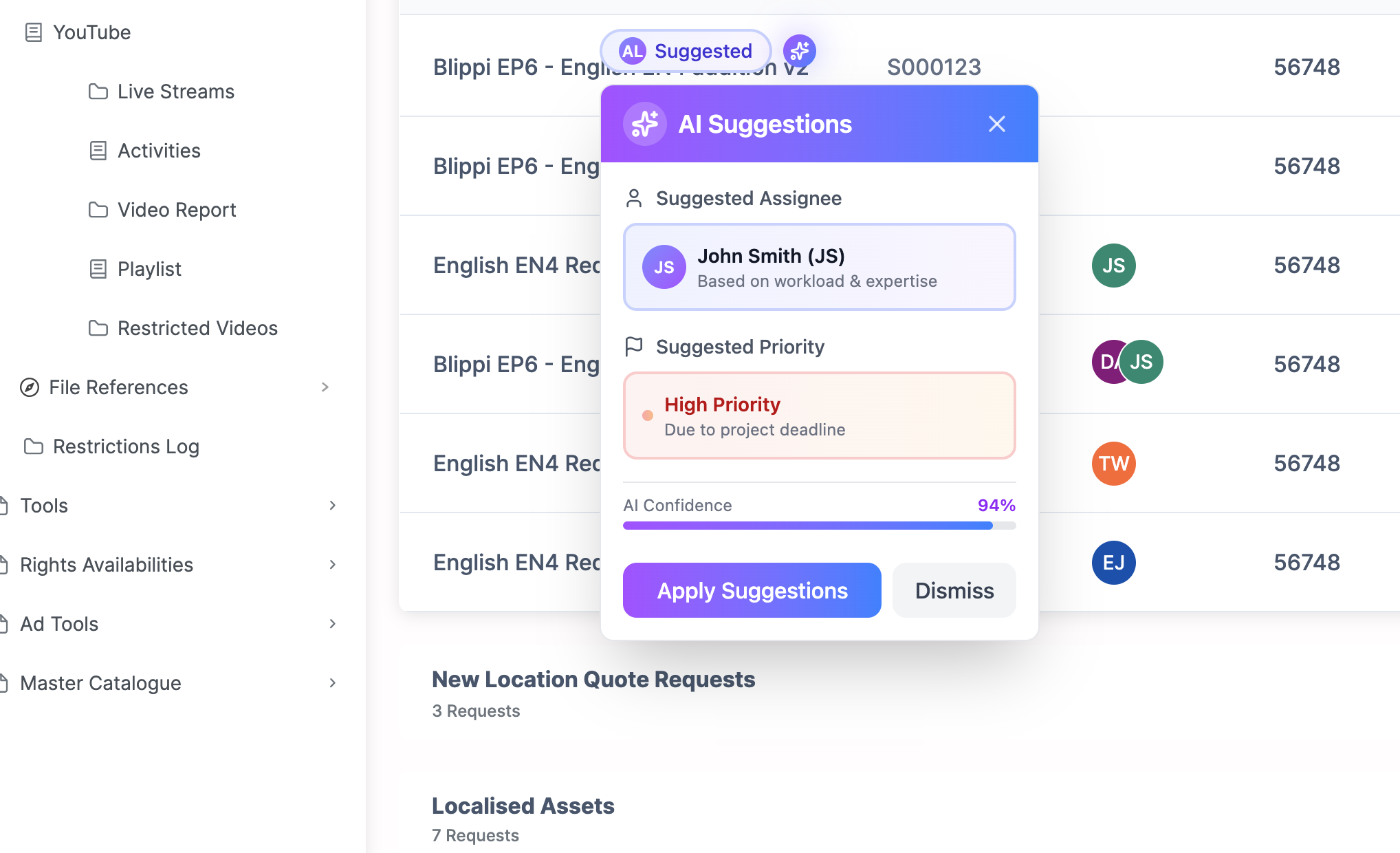
In the current system, someone still needs to check each incoming request and apply tags like request type, priority, department, region, or localisation greenlight status. This repetitive work is perfect for AI.
What it does
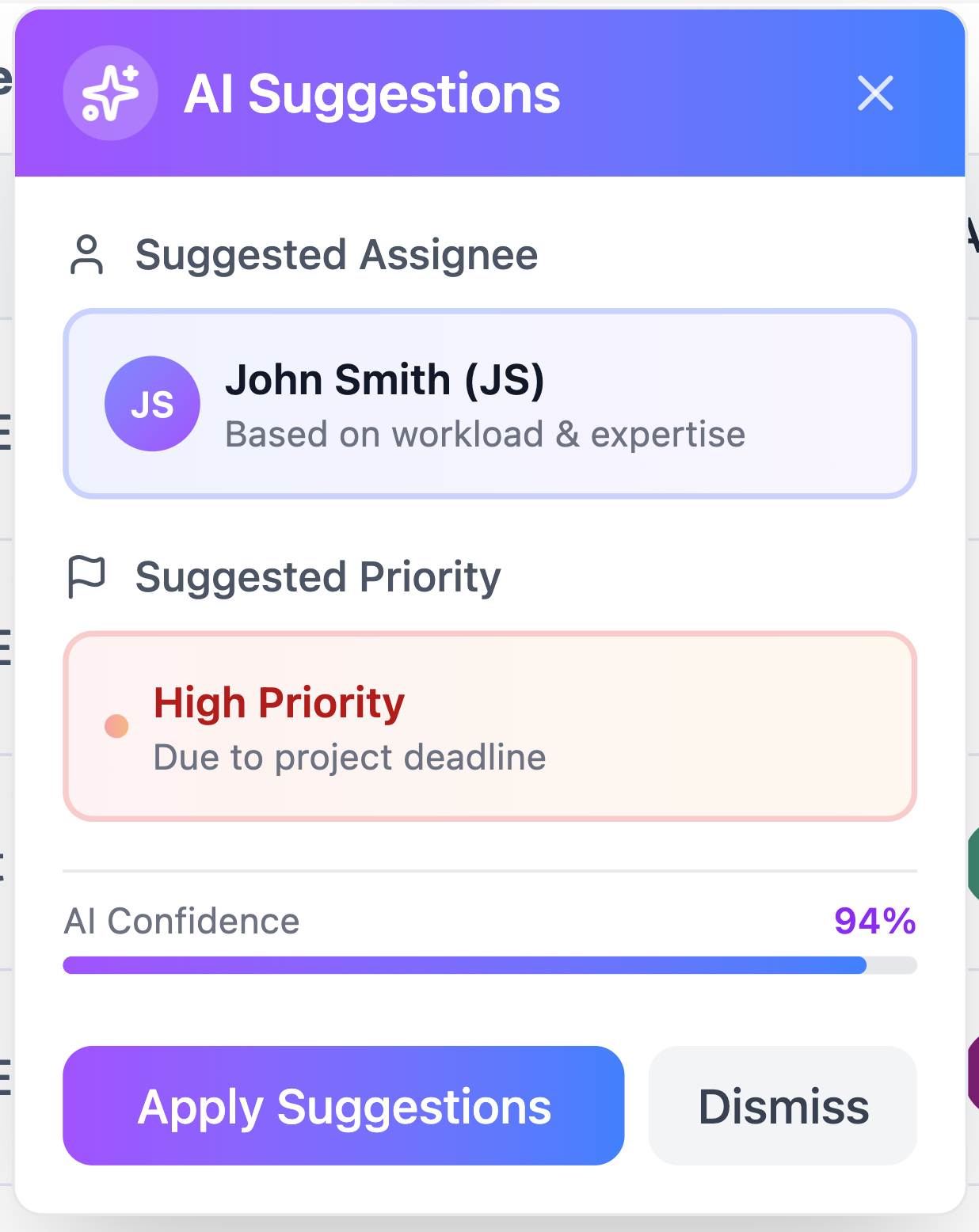
Reads each new request and automatically:
- Identifies the type of request
- Tags priority (deadline, complexity, client importance)
- Labels languages, region, and asset type
- Flags if localisation is or isn’t greenlit
Suggests assignees based on workload and past patterns
Benefit
Rows arrive pre-organised
Ops team can focus on actual execution instead of administration
Enables better dashboards, reporting, and search
Reduces human error
Localisation Request Tracker – AI Status & Communication Assistant
Automatic updates to Slack/email + intelligent summaries
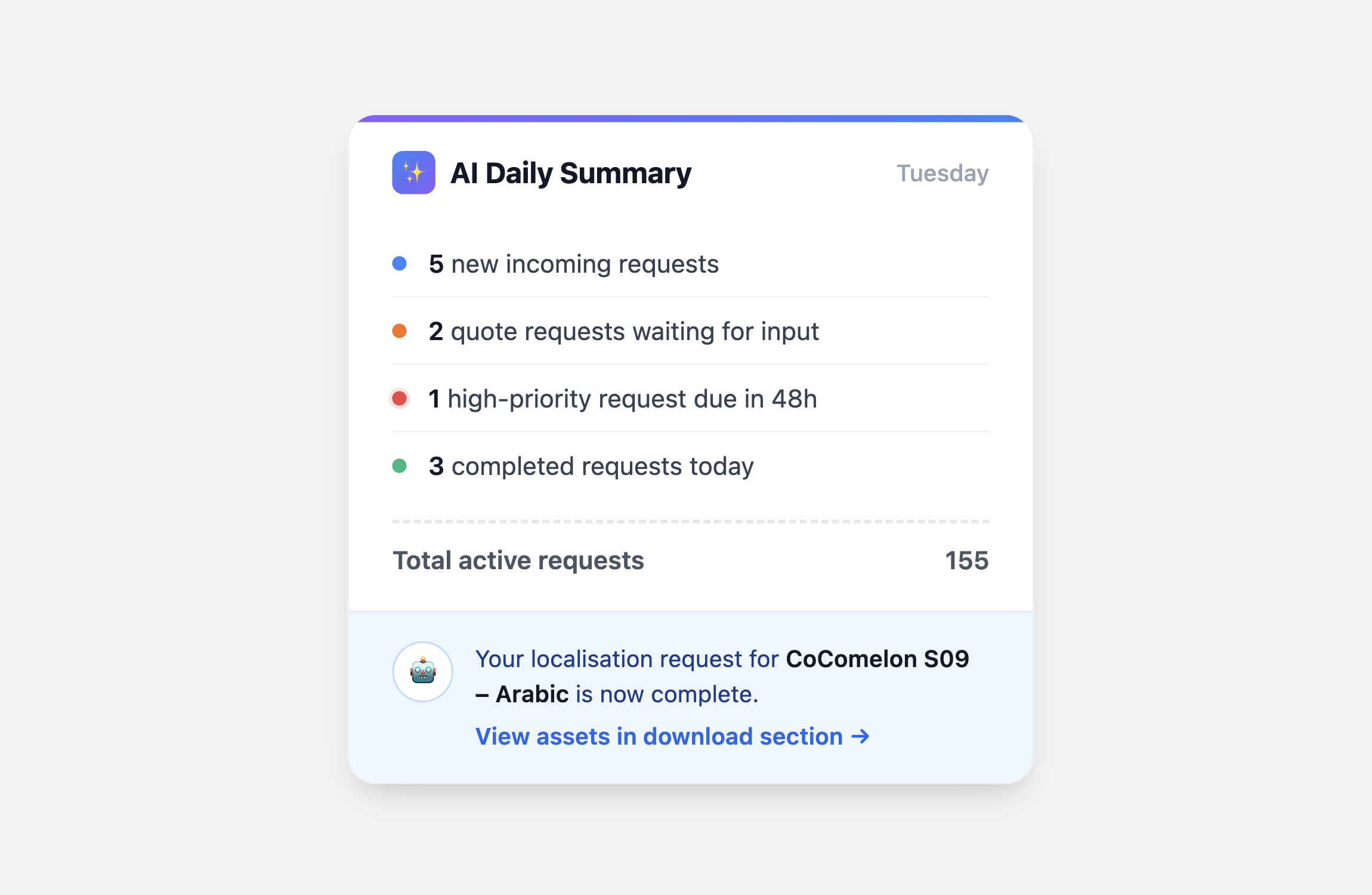
Teams currently send updates manually — typing status messages, reminders, follow-ups, and daily summaries. This is inconsistent and time-consuming. AI can transform the tracking table into automated communication.
What it does / will do
Generates easy-to-read summaries of requests, deadlines etc.
Sends automated Slack or email updates
Can generate “Ops updates” with one click
Notifies users when their request status changes
Benefits
- No manual status typing
- Ops managers get a real-time picture of the pipeline
- End-users stay fully informed
- Ensures consistency across all communications
Outcomes
Quantitative Results
~30 hours saved weekly through reduced manual Salesforce updates + fewer repeated entries
Improved request accuracy due to structured forms and reduced manual input
Faster retrieval time, as users could locate requests “in seconds”
Centralised workflow → fewer tools required to complete tasks
Production alignment improved with connected lifecycle flows
Qualitative Feedback
“Everything is clearer — I don’t need five tools to understand what’s going on anymore.”
“I can find what I need in seconds. This is much easier than searching through Salesforce”
“The status colours are great. You don’t have to interpret anything — you just know.”
“The AI makes my work so much more quicker, cuts down time to look for filter”
The redesign created measurable improvements across teams:
Time Saved
Eliminated manual Salesforce updates and duplicated entries
30 hours saved per week
Cleaner, more accurate data
Structured form submissions reduced inconsistencies
Fewer errors during handover between teams
- The AI-powered form assistant reduced incomplete or incorrect submissions.
Better visibility
Clear status chips made it easy to understand progress at a glance
Grouped sections helped teams prioritise tasks more effectively
- AI-generated daily summaries gave managers real-time updates without manual reporting.
Less tool-hopping
Reduced reliance on AirTable and Google Sheets
More workflows moved into Moonbase
Faster onboarding
Cleaner UI reduced the learning curve for new team members
User feedback
“This saves us so much time. We can actually see everything in one place.”
“I no longer recreate filters every time I log in.”
“The status tags make the page instantly scannable.”
What I Learned
Internal tools deserve the same level of UX care as external products
Automation often delivers more value than adding more features
Good data structure upfront prevents countless operational problems later
Designing for scalability is essential when a system manages hundreds of items
Visibility is not a feature, it’s an expectation
AI is most effective when augmenting, not replacing existing workflows
Through testing and stakeholder feedback, I learned that small AI interventions (auto-suggestions, smart routing, automated summaries) deliver more value than large, disruptive changes. Implementing AI features highlighted the importance of well-defined metadata, consistent naming, and predictable workflows. Without these foundations, AI accuracy drops significantly.
Next Steps
Introduce Salesforce → Moonbase bi-directional sync. With AI now validating and enriching incoming data
Add a dashboard for forecasting upcoming localisation volume
Integrate the Production Tracker into the main lifecycle
Phase out remaining AirTable workflows
Introduce predictive insights (risk alerts, workload forecasting)
Using historical request patterns, the next evolution of the tool would involve AI predicting delays, identifying bottlenecks, and forecasting localisation workload across teams.
Conclusion
This project transformed a fragmented, labour-intensive workflow into a more scalable, automated, and user-friendly system.
By simplifying the request flow, centralising data, and improving visibility, the design unlocked efficiency across multiple teams and eliminated over 30 hours of manual work each week.